Step 1
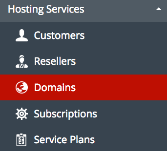
Login to the Plesk Panel. Then, from the hosting servers menu that located in the left, select DOMAINS.
Step 2
In Customer Panel select Manage for the relevant domain that you want to choose.

Step 3
At column on the right, select APPLICATION.
Step 4
Then, choose the WordPress Version that you need to use and click Install. If already install and need to update the latest version, just click Install button.

Step 5
You will be taken automatically into the CMS management screen once the installation has been compeleted. Plesk will automatically assign a random username and password. In the CMS management screen you may view your login credentials.